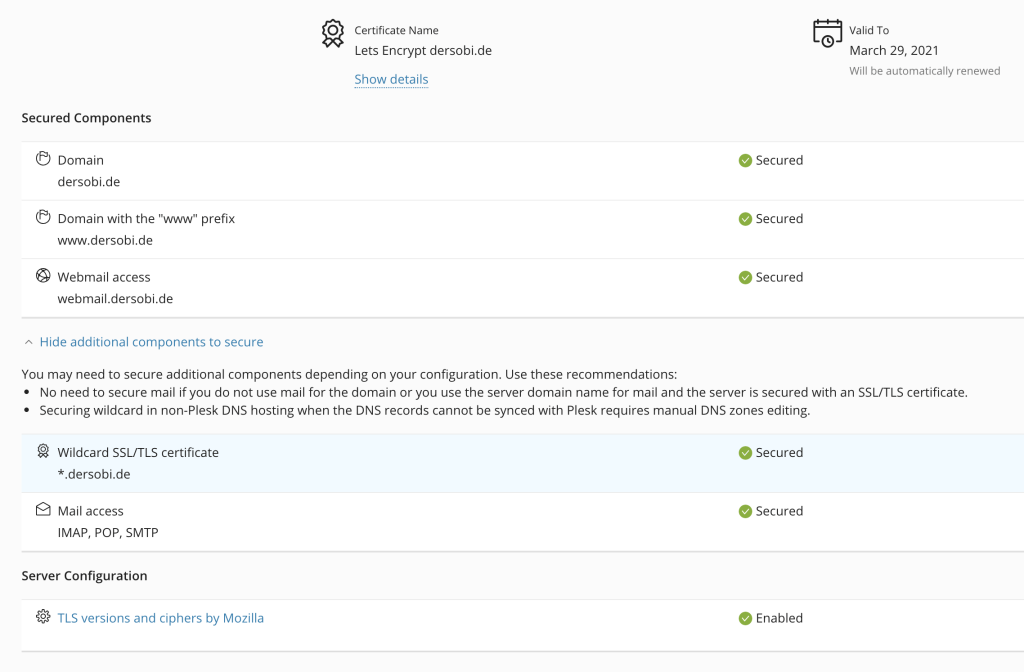
Certificate renewal for wildcard certificates when not using Plesk as DNS provider can be a little tricky if there is no Plesk plugin compatible with your DNS provider. In my case, I’m using a Plesk-enabled Webhosting server, running Ubuntu 18.04 Server, and Cloudflare as DNS provider for my websites.
As “certbot” already provides the “certbot-dns-cloudflare” module for doing this (I’ve been using the functionality on other webservers without Plesk), I needed only to find a way to “feed” the certificates to the Plesk system without interfering directly with the files and without circumventing the Plesk system.
So, after reading a bit the Plesk documentation referring to the certificates, I found out there is a quite simple way to do this using Plesk’s own CLI (Command-Line Interface).
Prerequisites:
My configuration at the time of writing this:
- Ubuntu Server 18.04.5 LTS
- Plesk Obsidian 18.0.32 Update #2
- certbot 0.27.0
The steps:
1. Issue a certificate from Plesk for your website (you can issue only for “your-domain.tld” and/or “www.your-domain.tld and SSL It! will do this automatically using http-01 challenge).
See: Securing a domain with a free Let’s Encrypt certificate (Plesk Onyx and Obsidian)
SSL It! will name your new certificate “Lets Encrypt yourdomain.tld”, if you’ve chosen another name for it please rename it so, we will need it later in this form.
2. If “yourdomain.tld” it’s your main domain issue a certificate for your server also, see: Securing Plesk interface with a free Let’s Encrypt certificate (Plesk Onyx and Obsidian)
Name or rename this certificate to “Lets Encrypt Server”.
3. Install certbot and certbot-dns-cloudflare extension. You can find a lot of tutorials on how to do this for your distribution, or you can use snap as explained on certbot’s website. I’ve chosen for my server to go with the Ubuntu packages:
root@yourdomain:~# apt update
root@yourdomain:~# apt install -y certbot python3-certbot-dns-cloudflare
root@yourdomain:~# certbot --version
 certbot 0.27.0
4. Get your Cloudflare API key (further help here), then set up your credentials file to be used later with certbot, I’ve chosen the “/etc/letsencrypt/.secrets/” folder for that:
root@yourdomain:~# mkdir /etc/letsencrypt/.secrets
root@yourdomain:~# chmod 0700 /etc/letsencrypt/.secrets/
root@yourdomain:~# touch /etc/letsencrypt/.secrets/cloudflare.ini
root@yourdomain:~# chmod 0400 /etc/letsencrypt/.secrets/cloudflare.ini
5. Open the “/etc/letsencrypt/.secrets/cloudflare.ini” file with your favorite editor and enter your Cloudflare login e-mail and API key:
dns_cloudflare_email = "[email protected]"
dns_cloudflare_api_key = "xxxxxxxxxxxxxxxxxxx"
6. Edit the “/etc/letsencrypt/cli.ini” configuration file and add the Cloudflare config file path and the “ACME v2 API endpoint” server which supports wildcard certificates:
# Cloudflare API login
dns-cloudflare-credentials = /etc/letsencrypt/.secrets/cloudflare.ini
# Production ACME v2 API endpoint
server = https://acme-v02.api.letsencrypt.org/directory
7. Create a folder for the scripts to generate/update your certificates, create the two files for generating new certificates, “cert.sh”, and updating Plesk on successful certificate generation, “update-plesk.sh”:
root@yourdomain:~# mkdir /etc/letsencrypt/scripts root@yourdomain:~# touch /etc/letsencrypt/scripts/cert.sh root@yourdomain:~# chmod +x /etc/letsencrypt/scripts/cert.sh root@yourdomain:~# touch /etc/letsencrypt/scripts/update-plesk.sh root@yourdomain:~# chmod +x /etc/letsencrypt/scripts/update-plesk.shcert.sh:
#!/bin/bash
# You can request the certificate for a single domain
# (domain.tld and *.domain.tld) with:
# >> cert.sh domain.tld
# or if you have aliases for your domain and you want the certificate
# to include these also (domain.tld, *.domain.tld, alias.tld, *.alias.tld):
# >> cert.sh domain.tld alias.tld
# *** Always put the domain first, followed by aliases ***
if [[ $1 ]]; then
        certbot certonly --dns-cloudflare \
         --deploy-hook "/etc/letsencrypt/scripts/update-plesk.sh $1" \
         $( for DOMAIN in "$@"; do
                echo "-d ${DOMAIN} "
                echo "-d *.${DOMAIN} "
         done )
else
        echo -e "Usage:\n$0 domain.tld [alias1.tld alias2.tld ...]"
fi
update-plesk.sh:
#!/bin/bash
#Letsencrypt configuration directory
LE_PATH="/etc/letsencrypt"
# Main domain for your server (when updating Plesk,
# it will update also the server certificate)
ADMIN_DOMAIN="server-domain.tld"
# The name of your server certificate in Plesk
ADMIN_CERT="Lets Encrypt Server"

if [[ $1 ]]; then
       DOMAIN=$1
else
       echo "No domain received"
       exit 1
fi
plesk bin certificate -u "Lets Encrypt ${DOMAIN}" -domain ${DOMAIN} \
 -key-file ${LE_PATH}/live/${DOMAIN}/privkey.pem \
 -cert-file ${LE_PATH}/live/${DOMAIN}/cert.pem \
 -cacert-file ${LE_PATH}/live/${DOMAIN}/chain.pem

if [[ ${DOMAIN} = ${ADMIN_DOMAIN} ]]; then
        plesk bin certificate -u "${ADMIN_CERT}" -admin \
         -key-file ${LE_PATH}/live/${DOMAIN}/privkey.pem \
         -cert-file ${LE_PATH}/live/${DOMAIN}/cert.pem \
         -cacert-file ${LE_PATH}/live/${DOMAIN}/chain.pem
fi
8. Now request your first certificate and if everything goes well verify the Plesk administration page of the domain, the wildcard domain should be ok now:
root@yourdomain:~# /etc/letsencrypt/scripts/cert.sh yourdomain.tld

Saving debug log to /var/log/letsencrypt/letsencrypt.log
Plugins selected: Authenticator dns-cloudflare, Installer None
Obtaining a new certificate
Performing the following challenges:
dns-01 challenge for yourdomain.tld
dns-01 challenge for yourdomain.tld
Waiting 10 seconds for DNS changes to propagate
Waiting for verification...
Cleaning up challenges
Running deploy-hook command: /etc/letsencrypt/scripts/update-plesk.sh yourdomain.tld
Output from update-plesk.sh:

SSL/TLS certificate 'Lets Encrypt yourdomain.tld' was successfully updated


IMPORTANT NOTES:
 - Congratulations! Your certificate and chain have been saved at:
   /etc/letsencrypt/live/yourdomain.tld/fullchain.pem
   Your key file has been saved at:
   /etc/letsencrypt/live/yourdomain.tld/privkey.pem
   Your cert will expire on 2021-04-06. To obtain a new or tweaked
   version of this certificate in the future, simply run certbot
   again. To non-interactively renew *all* of your certificates, run
   "certbot renew"
 - If you like Certbot, please consider supporting our work by:

   Donating to ISRG / Let's Encrypt:   https://letsencrypt.org/donate
   Donating to EFF:                    https://eff.org/donate-le
Plesk domain certificate administration:
Websites & Domains >> yourdomain.tld >> SSL/TLS Certificates