I’ve set up a little PHP script on my server to dynamically update IP’s for my home router (a FRITZ!Box 6950 Cable). Of course, it can be used for any type of router with a little change of the parameters.
What you’ll need in preparation:
- A PHP-enabled WEB Server (it can reside also in your private network, it only needs Internet access and should be reachable by your router),
- Cloudflare Global API Key ( you can get it here ),
- A glass of “Weissbier” to take care of all those “Pretzels” you ate ( only if you are of age! )
The PHP script ddns.php:
<?php
// Use script authentication ?
$sAuth = 1;                 // 0 (False) / 1 (True)
$username = "wie6Zoh2";    // used if script authentication is enabled
$password = "ohgh9Atu";

// Cloudflare DNS Update via API V4
$email = "[email protected]";                  // Cloudflare login e-mail
$apiKey = "ago5va9uqu9Sae2gasahYoo5ahngaes8ohl3A";  // Cloudflare API Key

// DNS Record options
$enableProxy = false;  // Toggle Cloudflare proxying for the address
$ttl = 1;              // TTL in seconds (1 for auto, or a value greater than 120)

// * Do not edit below this point, unless you know... meh, do what you want * //
// If auth is enabled check user&pass
if ($sAuth == 1) {
  if ($_REQUEST['user'] != $username || $_REQUEST['pass'] != $password) {
    exit ("Wrong credentials!");
  }
}

// Check minimum parameter requirements
if (!$_REQUEST['domain'] || !$_REQUEST['ipv4']) {
  exit ("Minimum parameter requirements not met!");
}

$zone = explode('.', $_REQUEST['domain'], 2)[1];  // domain
$dnsRecord = $_REQUEST['domain'];                 // subdomain
$ip4 = $_REQUEST['ipv4'];                         // ipv4 address
if ($_REQUEST['ipv6']) {
  $ip6 = $_REQUEST['ipv6'];                       // ipv6 address
}

{ // get Zone ID
$curl = curl_init();
curl_setopt_array($curl, array(
  CURLOPT_URL => "https://api.cloudflare.com/client/v4/zones",
  CURLOPT_RETURNTRANSFER => true,
  CURLOPT_ENCODING => "",
  CURLOPT_MAXREDIRS => 10,
  CURLOPT_TIMEOUT => 30,
  CURLOPT_HTTP_VERSION => CURL_HTTP_VERSION_1_1,
  CURLOPT_CUSTOMREQUEST => "GET",
  CURLOPT_HTTPHEADER => array(
    "cache-control: no-cache",
    "X-Auth-Email: ".$email,
    "X-Auth-Key: ".$apiKey
  ),
));
$response = curl_exec($curl);
$err = curl_error($curl);
curl_close($curl);

if ($err) {
  exit ("cURL Error #:" . $err);
} else {
  $obj = json_decode($response,true);
  if( $obj["success"]!=1)
  {
    exit ("GetZoneId Failed");
  }
  $zones =($obj['result']);
  foreach($zones as $zoneResult) {
    if($zoneResult['name']==$zone)
        $zoneId = $zoneResult['id'];
  }
  if ($zoneId =="") {
    exit ("Zone not found!");
  }
}
} // end get Zone ID

{ // get Record ID
$curl = curl_init();
curl_setopt_array($curl, array(
  CURLOPT_URL => "https://api.cloudflare.com/client/v4/zones/".$zoneId."/dns_records",
  CURLOPT_RETURNTRANSFER => true,
  CURLOPT_ENCODING => "",
  CURLOPT_MAXREDIRS => 10,
  CURLOPT_TIMEOUT => 30,
  CURLOPT_HTTP_VERSION => CURL_HTTP_VERSION_1_1,
  CURLOPT_CUSTOMREQUEST => "GET",
  CURLOPT_HTTPHEADER => array(
    "Cache-Control: no-cache",
    "X-Auth-Email: ".$email,
    "X-Auth-Key: ".$apiKey
  ),
));
$response = curl_exec($curl);
$err = curl_error($curl);
curl_close($curl);

if ($err) {
  exit ("cURL Error #:" . $err);
} else {
  $obj = json_decode($response,true);
  if( $obj["success"]!=1) {
      exit ("GetRecordID Failed");
  }
  $zones =($obj['result']);
  foreach($zones as $zoneResult) {
      if($zoneResult['name'] == $dnsRecord)
          $recordId[$zoneResult['type']] = $zoneResult['id'];
  }
}
} // end get Record ID

{ // Update records
function updateCloudflare($zid, $rid, $eml, $aky, $d, $opr) {
  if ($rid!="") {
    $rid = "/".$rid;
    if ($opr!="DELETE") {
        $opr = "PUT";
    }
  }
  $curl = curl_init();
  curl_setopt_array($curl, array(
    CURLOPT_URL => "https://api.cloudflare.com/client/v4/zones/".$zid."/dns_records".$rid,
    CURLOPT_RETURNTRANSFER => true,
    CURLOPT_ENCODING => "",
    CURLOPT_MAXREDIRS => 10,
    CURLOPT_TIMEOUT => 30,
    CURLOPT_HTTP_VERSION => CURL_HTTP_VERSION_1_1,
    CURLOPT_CUSTOMREQUEST => $opr,
    CURLOPT_HTTPHEADER => array(
      "Cache-Control: no-cache",
      "Content-Type: application/json",
      "X-Auth-Email:".$eml,
      "X-Auth-Key: ".$aky
    )
  ));
  if ($opr!="DELETE") {
    curl_setopt($curl, CURLOPT_POSTFIELDS, json_encode($d));
  }
  $response = curl_exec($curl);
  $err = curl_error($curl);
  curl_close($curl);
  if ($err) {
    exit ("cURL Error #:" . $err);
  } else {
    return json_decode($response);
  }
} // end function
// Update/Create ipv4 record
$data = array (
  'type' => 'A',
  'name' => $dnsRecord,
  'content' => $ip4,
  'proxiable' => true,
  'proxied' => $enableProxy,
  'ttl' => $ttl,
  'locked' => false,
  'zone_id' => $zoneId,
  'zone_name' => $zone
);
updateCloudflare($zoneId, $recordId['A'], $email, $apiKey, $data, "POST");
if ($ip6) {
  $data['type'] = 'AAAA';
  $data['content'] = $ip6;
  updateCloudflare($zoneId, $recordId['AAAA'], $email, $apiKey, $data, "POST");
} elseif ($recordId['AAAA']) { // we've received no ipv6 address but there is one on Cloudflare
  updateCloudflare($zoneId, $recordId['AAAA'], $email, $apiKey, $data, "DELETE");
}
} // end update records
?>
You need to open your router DynDNS configuration page, for FRITZ!Box under: Internet >> Permit Access >> DynDNS
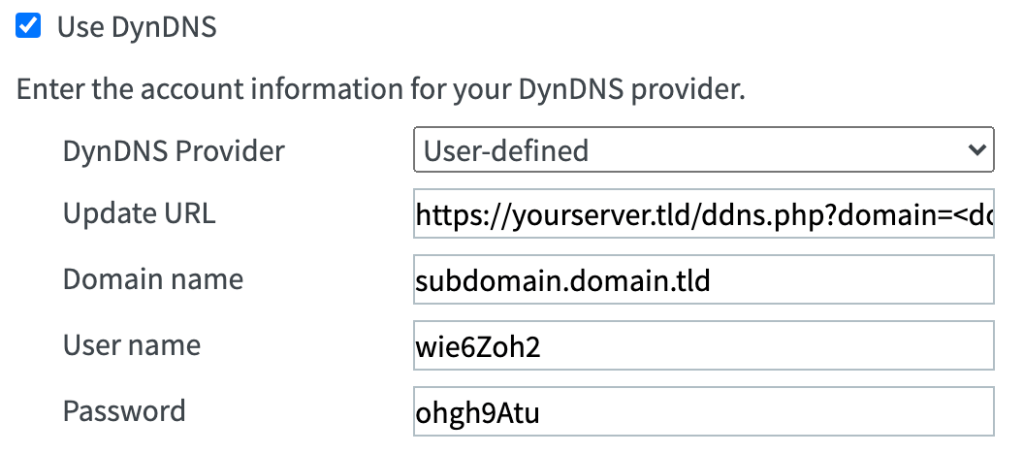
Complete the fields as follows:
"DynDNS Provider": User-defined
"Update URL":      https://yourserver.tld/ddns.php?domain=<domain>&ipv4=<ipaddr>&ipv6=<ip6addr>&user=<username>&pass=<pass>
"Domain name":     subdomain.yourdomain.tld
"User name":       wie6Zoh2 (username of your choosing)
"Password":        ohgh9Atu (choose a password)
In the update URL the “<domain>“, “<username>” and “<pass>” will pass along to the server the corresponding values of the fields below, and “<ipaddr>“, “<ip6addr>” will pass the ipv4 and ipv6 addresses from the FRITZ!Box router.
For other routers you can pass the domain, user and password directly in the URL (eg. domain=subdomain.yourdomain.tld&user=myusername&pass=mypassword) and for the IP(s) you must find what are the correct parameters for you model.
